
Clock code in sidebar
1 - Preview after installation
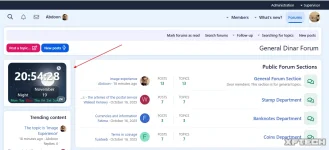
2- Installation Instructions:
1- From the control panel, go to >> Appearance >> Widgets >> Add Widget >> and select HTML.
2- Enter the widget key: for example, digital_clock.
3- From the Display in Positions menu: select Forums > Sidebar.
4- In the template, copy the following attached code.
1 - Preview after installation
2- Installation Instructions:
1- From the control panel, go to >> Appearance >> Widgets >> Add Widget >> and select HTML.
2- Enter the widget key: for example, digital_clock.
3- From the Display in Positions menu: select Forums > Sidebar.
4- In the template, copy the following attached code.
Less:
<div class="digital-clock-widget theme-day" data-locale="en">
  <div class="clock-ampm">--</div>

  <div class="clock-icon" aria-hidden="true">
    <xf:fa icon="fas fa-clock" class="clock-icon" />
    <svg xmlns="http://www.w3.org/2000/svg" role="img" aria-hidden="true">
      <use href="/data/local/icons/solid.svg#clock"></use>
    </svg>
  </div>

  <button class="clock-format-toggle" type="button" aria-label="Toggle 12/24">24</button>

  <div class="clock-background active">
    <div class="sun"></div>
    <div class="moon"></div>
    <div class="city-silhouette" aria-hidden="true"></div>
    <div class="stars" aria-hidden="true"></div>

    <div class="clouds">
      <div class="cloud"></div>
      <div class="cloud"></div>
      <div class="cloud"></div>
    </div>
  </div>

  <div class="clock-foreground">
    <div class="clock-time">--:--:--</div>
    <div class="clock-info">
      <div class="clock-date">-- --</div>
      <div class="clock-period">--</div>
    </div>
  </div>

  <div class="clock-weekdays">

    <span class="weekday" data-day="0"></span>
    <span class="weekday" data-day="6"></span>
    <span class="weekday" data-day="5"></span>
    <span class="weekday" data-day="4"></span>
    <span class="weekday" data-day="3"></span>
    <span class="weekday" data-day="2"></span>
    <span class="weekday" data-day="1"></span>
  </div>
</div>

<style>

.digital-clock-widget{
  text-align:center;
  padding:3px;
  color:white;
  position:relative;
  overflow:hidden;
  width:100%;
  height:150px;
  margin:0 auto;
  user-select:none;
  aspect-ratio:3/2;
}


.clock-icon{
  position:absolute;top:6px;right:10px;
  color:hsla(0,0%,100%,.8);font-size:16px;z-index:10;pointer-events:none;transition:color .3s ease
}
.clock-icon .fas{width:16px;text-align:center}


.clock-ampm{
  position:absolute;top:6px;left:10px;
  color:hsla(0,0%,100%,.85);font-size:16px;font-weight:bold;text-transform:uppercase;z-index:10;pointer-events:none;opacity:0;transition:opacity .3s ease
}
.digital-clock-widget.is-12hour .clock-ampm{opacity:1}


.clock-background{position:absolute;top:0;left:0;right:0;bottom:0;z-index:1;opacity:0;transition:opacity 1.8s ease-out;pointer-events:none}
.clock-background.active{opacity:1}
.clock-background.next{opacity:0;z-index:0;transition:opacity 1.8s ease-out}


.clock-foreground{position:relative;z-index:2;display:flex;flex-direction:column;justify-content:center;height:100%;text-shadow:1px 1px 4px hsla(0,0%,0%,.7)}
.clock-time{font-size:2.8em;font-weight:bold;margin-bottom:8px}
.clock-info{display:flex;justify-content:space-between;font-size:1.0em;letter-spacing:0.5px;padding:0 25px}
.clock-date{align-self:flex-start;background:hsla(0,0%,0%,.3);padding:2px 8px;border-radius:6px;backdrop-filter:blur(4px)}
.clock-period{align-self:flex-end;background:hsla(0,0%,0%,.3);padding:2px 8px;border-radius:6px;backdrop-filter:blur(4px)}


.clock-format-toggle{
  position:absolute;bottom:5px;right:5px;top:auto;
  background:hsla(0,0%,100%,.2);
  border:1px solid hsla(0,0%,100%,.4);
  color:white;font-size:12px;width:30px;height:20px;border-radius:10px;cursor:pointer;z-index:10;font-weight:bold;backdrop-filter:blur(2px);transition:all .2s ease
}
.clock-format-toggle:hover{background:hsla(0,0%,100%,.3);transform:scale(1.05)}


.digital-clock-widget, .clock-date, .clock-period, .clock-format-toggle{border-radius:15px !important}


.clock-weekdays{
  position:absolute;bottom:3px;left:10px;display:flex;gap:6px;font-size:12px;z-index:2
}
.clock-weekdays .weekday{
  color:#2ecc71 !important;
  font-weight:600;
  text-decoration:none !important;
  transition:color .2s ease;
}
.clock-weekdays .weekday.today{
  color:#ff0000 !important;
  font-weight:800;
}

.clock-weekdays .weekday[data-day="6"],
.clock-weekdays .weekday[data-day="0"]{ color:inherit !important }


.cloud{position:absolute;background:hsla(0,0%,100%,.8);border-radius:50px;filter:blur(2px);animation:moveCloud linear infinite}
.cloud::before,.cloud::after{content:'';position:absolute;background:hsla(0,0%,100%,.8);border-radius:50%}
.cloud::before{width:60%;height:100%;top:-30%;left:30%}
.cloud::after{width:50%;height:80%;top:-20%;left:10%}
@keyframes moveCloud{0%{transform:translateX(-150px)}100%{transform:translateX(120%)}}

.theme-morning .clock-background,
.theme-morning .clock-background.next{background:linear-gradient(180deg, hsl(35,100%,91%), hsl(15,94%,81%))}
.theme-morning .sun{position:absolute;top:30%;right:20%;width:60px;height:60px;background:#FFD700;border-radius:50%;box-shadow:0 0 20px hsl(39,100%,50%),0 0 40px hsl(33,100%,50%);animation:pulse 3s infinite alternate}
.theme-morning .clouds .cloud{height:25px;width:70px;top:20%}
.theme-morning .clouds .cloud:nth-child(1){animation-delay:0s;animation-duration:40s}
.theme-morning .clouds .cloud:nth-child(2){top:15%;width:90px;height:30px;animation-delay:5s;animation-duration:50s}

.theme-day .clock-background,
.theme-day .clock-background.next{background:linear-gradient(180deg, hsl(177,66%,79%), hsl(210,45%,91%))}
.theme-day .sun{position:absolute;top:25%;right:15%;width:70px;height:70px;background:#FFD700;border-radius:50%;box-shadow:0 0 30px hsl(39,100%,50%),0 0 60px hsl(16,100%,50%);animation:float 4s infinite ease-in-out}
.theme-day .clouds .cloud{height:28px;width:80px;top:20%}
.theme-day .clouds .cloud:nth-child(1){animation-delay:0s;animation-duration:35s}
.theme-day .clouds .cloud:nth-child(2){top:12%;width:100px;height:35px;animation-delay:8s;animation-duration:45s}
.theme-day .clouds .cloud:nth-child(3){top:30%;width:60px;height:20px;opacity:0.6;animation-delay:3s;animation-duration:55s}

.theme-evening .clock-background,
.theme-evening .clock-background.next{background:linear-gradient(135deg, hsl(358,100%,80%) 0%, hsl(319,96%,90%) 30%, hsl(317,88%,87%) 50%, hsl(218,68%,79%) 80%, hsl(210,47%,64%) 100%)}
.theme-evening .sun{position:absolute;width:70px;height:70px;background:#FF6B35;border-radius:50%;box-shadow:0 0 30px hsl(16,100%,50%),0 0 50px hsla(24,100%,50%,.5);animation:sunset-glow 4s infinite alternate,sunset-sink 20s linear infinite;z-index:2}
@keyframes sunset-glow{0%{transform:scale(1);box-shadow:0 0 30px hsl(16,100%,50%),0 0 50px hsla(24,100%,50%,.5)}100%{transform:scale(1.05);box-shadow:0 0 40px hsl(16,100%,60%),0 0 70px hsla(24,100%,50%,.7)}}
@keyframes sunset-sink{0%{top:25%;opacity:1}100%{top:85%;opacity:0.6}}
.theme-evening .city-silhouette{position:absolute;bottom:0;left:0;right:0;height:35%;background:#1a1a2e;clip-path:polygon(0% 100%, 10% 70%, 15% 85%, 20% 60%, 25% 75%, 30% 50%, 35% 70%, 40% 40%, 45% 60%, 50% 50%, 55% 70%, 60% 40%, 65% 60%, 70% 50%, 75% 70%, 80% 45%, 85% 65%, 90% 50%, 100% 100%);z-index:1;opacity:0.9}
.theme-evening .clouds .cloud{background:hsla(32,100%,85%,.7);height:22px;width:80px;top:20%;filter:blur(2px);box-shadow:0 0 10px hsla(27,100%,74%,.3)}
.theme-evening .clouds .cloud::before,.theme-evening .clouds .cloud::after{background:hsla(32,100%,85%,.7)}

.theme-night .clock-background,
.theme-night .clock-background.next{background:linear-gradient(135deg, hsl(219,41%,13%), hsl(212,40%,24%))}
.theme-night .moon{position:absolute;top:25%;right:20%;width:50px;height:50px;background:#f4f4f4;border-radius:50%;box-shadow:0 0 20px hsl(0,0%,100%),0 0 40px hsl(0,0%,90%);animation:shine 4s infinite alternate}
.theme-night .moon::after{content:'';position:absolute;top:10px;left:15px;width:8px;height:8px;background:#d2d2d2;border-radius:50%;box-shadow:8px 4px 0 2px hsl(0,0%,82%),4px -6px 0 1px hsl(0,0%,82%)}
.theme-night .stars{position:absolute;top:0;left:0;right:0;bottom:0;pointer-events:none}
.theme-night .star{position:absolute;background:white;border-radius:50%;animation:twinkle 2s infinite alternate}
@keyframes twinkle{0%{opacity:0.3}100%{opacity:1}}

.clock-weekdays .weekday{
  color:#2ecc71 !important;
  font-weight:600;
}

.clock-weekdays .weekday[data-day="6"],
.clock-weekdays .weekday[data-day="0"]{
  color:#2ecc71 !important;
  font-weight:600 !important;
}


.clock-weekdays .weekday.today{
  color:#ff0000 !important;
  font-weight:600 !important;
}


@keyframes pulse{0%{transform:scale(1)}100%{transform:scale(1.1)}}
@keyframes float{0%,100%{transform:translateY(0)}50%{transform:translateY(-10px)}}

@keyframes shine{0%{box-shadow:0 0 20px hsl(0,0%,100%)}100%{box-shadow:0 0 40px hsl(0,0%,100%),0 0 60px hsl(0,0%,90%)}}
</style>

<script>
(function(){
  document.addEventListener("DOMContentLoaded", () => {
    const root = document.querySelector(".digital-clock-widget");
    if(!root) return;

    const clockTime = root.querySelector(".clock-time");
    const clockDate = root.querySelector(".clock-date");
    const clockPrd  = root.querySelector(".clock-period");
    const ampmEl    = root.querySelector(".clock-ampm");
    const weekdays  = root.querySelectorAll(".weekday");
    const toggleBtn = root.querySelector(".clock-format-toggle");
    const starsWrap = root.querySelector(".stars");

    // اللغة
    const forced = (root.dataset.locale || "en").toLowerCase();
    const locale = forced === "auto" ? (navigator.language || "en") : forced;
    const labels = { ar:{day:"نهار", night:"ليل"}, en:{day:"Day", night:"Night"} };
    const lang = (locale.split("-")[0] || "en");
    const L = labels[lang] || labels.en;

    (function fillWeekdays(){
      for (let d = 0; d < 7; d++) {
        const sample = new Date(Date.UTC(2021,7,1 + d)); // Aug 1 2021 + d
        const dayIndex = sample.getUTCDay();            // 0..6
        const el = root.querySelector(`.weekday[data-day="${dayIndex}"]`);
        if (el) {
          try {
            let txt = new Intl.DateTimeFormat(locale, { weekday: "short" }).format(sample);
            txt = txt.replace(/\./g, "");
            el.textContent = txt;
          } catch(e) { el.textContent = sample.toLocaleDateString(); }
        }
      }
    })();

    function createStars(count = 25) {
      if(!starsWrap) return;
      starsWrap.innerHTML = "";
      for (let i=0; i<count; i++){
        const s = document.createElement("div");
        s.className = "star";
        const size = 1 + Math.random()*2.5;
        s.style.width = s.style.height = size + "px";
        s.style.left = Math.random()*100 + "%";
        s.style.top = Math.random()*100 + "%";
        s.style.opacity = 0.4 + Math.random()*0.8;
        s.style.animationDuration = (1 + Math.random()*2) + "s";
        starsWrap.appendChild(s);
      }
    }

    if(toggleBtn.textContent.trim() === "12") root.classList.add("is-12hour");
    else root.classList.remove("is-12hour");

    function setThemeByHour(h){
      let theme = "theme-day";
      if (h >= 5 && h < 9) theme = "theme-morning";
      else if (h >= 9 && h < 17) theme = "theme-day";
      else if (h >= 17 && h < 20) theme = "theme-evening";
      else theme = "theme-night";
      ["theme-morning","theme-day","theme-evening","theme-night"].forEach(c => root.classList.remove(c));
      root.classList.add(theme);
      if (theme === "theme-night") createStars(28); else if (starsWrap) starsWrap.innerHTML = "";
    }

    function updateClock(){
      const now = new Date();
      const h = now.getHours();
      const m = String(now.getMinutes()).padStart(2,"0");
      const s = String(now.getSeconds()).padStart(2,"0");

      const is12 = root.classList.contains("is-12hour");
      const displayH = is12 ? ((h % 12) || 12) : String(h).padStart(2,"0");

      ampmEl.textContent = h >= 12 ? "PM" : "AM";
      clockTime.textContent = displayH + ":" + m + ":" + s;

      try {
        clockDate.textContent = now.toLocaleDateString(locale, { day: "numeric", month: "long" });
      } catch(e){
        clockDate.textContent = now.getDate() + " " + (now.getMonth()+1);
      }

      clockPrd.textContent = (h >= 6 && h < 18) ? (L.day || "Day") : (L.night || "Night");
      setThemeByHour(h);

      weekdays.forEach(w => w.classList.remove("today"));
      const today = root.querySelector(`.weekday[data-day="${now.getDay()}"]`);
      if (today) today.classList.add("today");
    }

    toggleBtn.addEventListener("click", () => {
      if(root.classList.contains("is-12hour")){
        root.classList.remove("is-12hour");
        toggleBtn.textContent = "24";
      } else {
        root.classList.add("is-12hour");
        toggleBtn.textContent = "12";
      }
      updateClock();
    });

    updateClock();
    setInterval(updateClock, 1000);
  });
})();
</script>